Salesforce Lightning Features

Top 7 Salesforce Lightning Features Transforming Business Automation in 2025

Introduction: How Salesforce Lightning Transfer Business Automation

As we enter 2025, businesses are accelerating their shift towards automation to optimize operations, deliver exceptional customer experiences, and drive growth. Salesforce Lightning stands out as a leader in the CRM ecosystem, offering cutting-edge features tailored for modern businesses. From simplifying workflows to leveraging artificial intelligence, Salesforce Lightning’s robust features empower organizations to work smarter and faster.

Here’s a deep dive into the 7 Salesforce Lightning features that are revolutionizing business automation and why they are indispensable for 2025.

1. Lightning Flow: Simplifying Complex Processes

In the age of automation, repetitive and manual tasks are the first to go. Enter Lightning Flow, Salesforce’s premier tool for creating seamless workflows and approval processes.

What Is Lightning Flow?

Lightning Flow allows users to design, automate, and optimize complex workflows using a drag-and-drop interface. It caters to all levels of technical expertise, ensuring that even non-technical users can create impactful processes.

Benefits of Lightning Flow

  • Time-Saving Automation: Eliminates redundant manual tasks like data entry or email follow-ups.
  • Error Reduction: Automates processes with built-in logic, reducing the likelihood of human error.
  • Enhanced Collaboration: Allows team members to track and share progress in real-time.

Use Case

Imagine a global sales team managing leads. With Lightning Flow, leads can be automatically assigned to sales reps based on location, ensuring faster follow-ups and higher conversions.

2. Einstein AI: Insights That Drive Decisions

In an era of data-driven decision-making, Einstein AI emerges as a game-changer. By integrating artificial intelligence directly into Salesforce, Einstein provides predictive insights and actionable recommendations.

How Einstein AI Works

Einstein analyzes historical data, customer behavior, and market trends to forecast outcomes, prioritize actions, and suggest next steps.

Key Features

  • Predictive Lead Scoring: Identifies leads with the highest conversion potential.
  • Opportunity Insights: Recommends the next best actions to close deals faster.
  • Natural Language Processing: Analyzes customer sentiment in emails and chats.

Use Case

A retail business can use Salesforce Einstein AI to predict customer churn, allowing them to proactively engage with at-risk customers through personalized offers.

Start making smarter decisions with Salesforce implementation for businesses.

3. App Builder: Customization Without Code

Businesses need tools that adapt to their unique workflows, and the Lightning App Builder provides exactly that.

What Is Lightning App Builder?

The App Builder empowers users to design custom applications tailored to their business needs—without writing a single line of code.

Benefits

  • Flexibility: Create apps for specific departments, such as sales dashboards or HR portals.
  • Cost-Effective Customization: No need to hire developers for basic app customization.
  • Rapid Deployment: Design and deploy apps in days, not months.

Use Case

A real estate agency can use the App Builder to create a property management app, displaying available properties, client details, and agent performance in one interface.

4. Dynamic Forms and Pages: Delivering Personalized Experiences

Customers expect personalized interactions, and Dynamic Forms and Pages help businesses meet that demand.

How It Works

Dynamic Forms allow businesses to display fields and components on a page based on specific criteria, such as user roles, record types, or customer segments.

Benefits

  • Improved User Experience: Show only relevant information to specific users.
  • Efficiency Gains: Minimize clutter and simplify data input.
  • Real-Time Personalization: Adapt pages dynamically based on customer behavior.

Use Case

An insurance company can use Dynamic Forms to display policy renewal options only for customers nearing their expiration date.

5. Lightning Experience: A New Era of Productivity

The Lightning Experience redefines how users interact with Salesforce, focusing on speed, usability, and aesthetics.

Key Features

  • Enhanced Navigation: Simplified menus and workspaces tailored to user needs.
  • Faster Loading Times: Designed for efficiency, especially in data-heavy environments.
  • Optimized Mobile Experience: Seamlessly transition between desktop and mobile.

Why It Matters

Sales teams can access customer insights in seconds, making client interactions more meaningful and productive.

Upgrade to Lightning Experience with our Salesforce consulting services.

6. Integration with Third-Party Tools

In today’s digital ecosystem, no tool works in isolation. Salesforce Lightning excels in integrating with third-party tools to create a unified tech stack.

  • Slack: Streamline team communication and project updates.
  • Zoom: Schedule and conduct virtual meetings directly within Salesforce.
  • Google Workspace: Sync emails, calendars, and documents seamlessly.

Use Case

A consulting firm can integrate Slack to receive real-time alerts when a deal is closed, ensuring immediate team collaboration on onboarding.

Explore seamless integrations with Salesforce features in the upcoming years.

7. Lightning Reports and Dashboards: Insights at Your Fingertips

Data visualization plays a crucial role in tracking performance and making informed decisions. Lightning Reports and Dashboards take this to the next level.

What It Offers

  • Customizable Dashboards: Tailor views to track KPIs relevant to specific teams.
  • Real-Time Updates: Access the latest metrics anytime, anywhere.
  • Interactive Reports: Drill down into data for deeper insights.

Use Case

A sales manager can create a dashboard to monitor team performance, identify top-performing reps, and address underperforming areas.

Conclusion: Empower Your Business with Salesforce Lightning

The future of business automation is here, and Salesforce Lightning is leading the charge. By embracing features like Einstein AI, Lightning Flow, and Dynamic Forms, businesses can unlock new levels of efficiency and growth in 2025.

If you’re ready to harness the power of Salesforce Lightning for your organization, contact Megabytes Technologies today. From Salesforce customization to CRM strategies, we’ll help you stay ahead in this competitive landscape.

10 Must-Have Salesforce Features for Every Business in 2025

10 Must-Have Salesforce Features for Every Business in 2025

Salesforce Features in 2025

As we step into 2025, businesses are evolving at an unprecedented pace, and so are their needs for managing customer relationships. Salesforce, the world’s leading CRM platform, is not just a tool—it’s a strategic partner that empowers organizations to achieve unparalleled efficiency, customer satisfaction, and growth.

But with so many features available, how do you know which ones are crucial for your business? This guide explores the top 10 Salesforce features every business should leverage in 2025 to enhance operations, drive sales, and deliver exceptional customer experiences.

Whether you’re looking into Salesforce implementation, Salesforce integration services, or simply aiming to adopt CRM best practices, this blog is for you.

1. Einstein Analytics: AI-Powered Insights for Smarter Decisions

Gone are the days of relying solely on intuition. Einstein Analytics, Salesforce’s AI-driven feature, empowers businesses to:

  • Predict customer behavior.
  • Identify trends in real-time.
  • Automate data-driven recommendations.

Why You Need It: Salesforce Einstein’s capabilities can revolutionize your CRM experience and drive business growth.

2. Salesforce Flow: Streamlining Business Processes

Salesforce Flow simplifies workflows by automating repetitive tasks and integrating complex processes.

  • Visualize processes with drag-and-drop tools.
  • Automate approvals, data updates, and email notifications.

CRM Best Practices: Save time and reduce human errors with tailored automation workflows.

3. Customer 360: A Holistic View of Your Customers

Customer 360 combines data from marketing, sales, service, and more into a unified dashboard, offering a single source of truth.

  • Personalize customer interactions.
  • Enhance customer retention and loyalty.

Business Growth with Salesforce: Understanding your customers better drives loyalty and revenue.

4. Sales Cloud: Closing Deals Faster

Sales Cloud, a flagship Salesforce product, is a game-changer for sales teams.

  • Optimize lead management.
  • Automate sales forecasting.
  • Collaborate seamlessly with built-in tools.

Pro Tip: Combine Sales Cloud with Einstein Analytics for deeper insights into your sales funnel.

5. Marketing Cloud: Connecting with Customers Personally

In 2025, personalization will dominate marketing strategies. Marketing Cloud helps businesses:

  • Deliver tailored campaigns across multiple channels.
  • Use AI for segmenting audiences.
  • Track campaign performance in real-time.

CRM Best Practices: Align your marketing and sales efforts for consistent messaging.

6. Service Cloud: Elevating Customer Support

Customer support is no longer reactive—it’s proactive. With Service Cloud, you can:

  • Provide omnichannel support.
  • Use AI-driven chatbots for 24/7 assistance.
  • Monitor case resolutions efficiently.

Salesforce Consulting Services: Service Cloud ensures every customer feels valued.

7. Tableau CRM: Visualize Data Like Never Before

Tableau CRM, integrated into Salesforce, offers advanced data visualization capabilities.

  • Turn raw data into interactive dashboards.
  • Share insights across teams effortlessly.

Salesforce Features: A must-have for data-driven decision-making in 2025.

8. Salesforce Shield: Ensuring Data Security

As cyber threats grow, data security is a top priority. Salesforce Shield protects sensitive information through:

  • Advanced encryption.
  • Real-time monitoring.
  • Audit trail tracking.

Business Growth with Salesforce: Protect your customers’ trust by safeguarding their data.

9. AppExchange: Expanding Salesforce Functionality

Salesforce AppExchange allows businesses to explore and integrate third-party apps seamlessly.

  • Discover tools for finance, HR, and more.
  • Customize your CRM experience.

Pro Tip: Combine AppExchange apps with Salesforce integration services for maximum impact.

10. Slack Integration: Enhancing Team Collaboration

With Salesforce and Slack working together, communication within teams becomes effortless.

  • Share updates directly from Salesforce to Slack channels.
  • Improve productivity through instant collaboration.

CRM Best Practices: Break down silos and promote collaboration across departments.

Conclusion: The Time to Act is Now

Salesforce isn’t just a CRM; it’s the foundation for business success in 2025. By leveraging these top 10 features, you can transform how your business operates, engages customers, and drives growth.

Need help implementing these features?

At Megabytes Technologies, we specialize in Salesforce consulting services, Salesforce implementation, and Salesforce integration services to ensure your business reaps the full benefits of this powerful platform.

Contact us today to revolutionize your CRM strategy with business growth with Salesforce solutions!

Exploring Salesforce Summer 2024

Exploring Salesforce Summer 2024: Must-Know Features and Enhancements

Discover the new features and improvements in the Salesforce Summer ’24 Release! Whether you’re an experienced Salesforce user or just starting out, these updates are set to make a big impact. Let’s take a closer look at the key features now available to you!

Comprehensive Salesforce Enhancements:

User’s Permissions and Access:

The User Access Summary provides a streamlined way to access important details right from the user’s profile page, reducing the need for multiple queries and manual checks. This feature eliminates the need to individually review profiles, permission sets, public groups, or queues when managing or troubleshooting access.

To use this feature, go to Setup, type ‘Users’ into the Quick Find box, and select ‘Users.’ Then, choose a user and click on ‘View Summary’ to see the information.

Multi-Factor Authentication (MFA) Now Standardised:

Salesforce is advancing its security measures by requiring Multi-Factor Authentication (MFA) for all users. This new mandate will strengthen protection against unauthorized access and safeguard sensitive business information. Starting April 8, 2024, MFA will be automatically enabled for all newly created production organizations. Existing users are also advised to implement MFA to add an additional layer of security beyond just usernames and passwords.

Visibility of Cross-Object Fields and Alignment of Blank Spaces on Pages Enabled with Dynamic Forms:

Administrators now have the ability to enhance data visibility and user experience by showing fields from related records directly on a record page. For example, an admin can set up the Opportunity page to display the Account phone number alongside Opportunity-specific details. This functionality simplifies data access, minimizing the need for users to switch between records to find related information.

Enhance field alignment in Dynamic Forms sections using the new Blank Space component. This component allows you to create vertical spacing between fields within a section. Additionally, you can combine the Blank Space component with the Align Fields Horizontally option to achieve better alignment.

Enhancements to Flows:

Automation Lightning App:

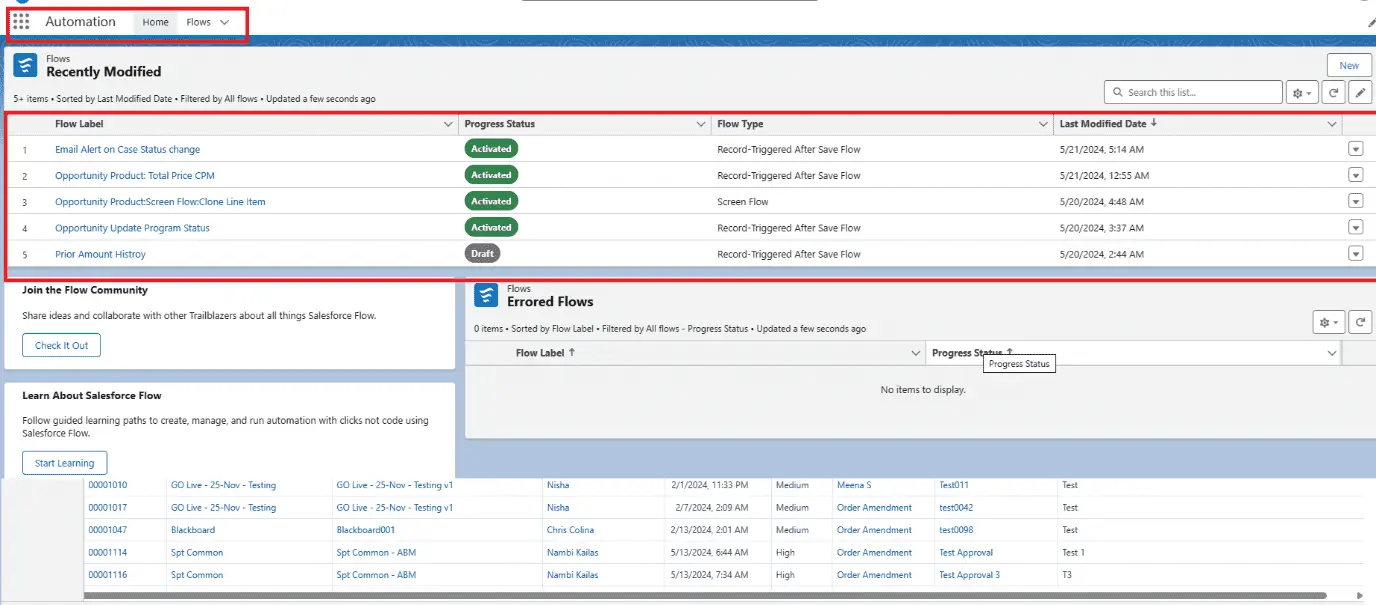
Use the Automation Lightning app to track and control your flows, now available to all flow admins and authorized users. Through this app, you can start new flows or edit existing ones in Flow Builder, assuming you have the required permissions. The app includes new list views that show your recently updated flows and those with errors. You can search flows by keyword, and apply filters or sort them by type, status, last modification date, the user who last modified them, and related record fields.

Find Flows That Include Email Alerts:

Salesforce now provides a method to easily identify which of your automated processes (flows) include email alerts. This feature is valuable for admins who need to oversee or modify these alerts. For instance, if there are updates to company policies or contact information, you can promptly find and adjust the relevant flows, eliminating the need to check each one individually. It’s like having an organized system that allows you to quickly locate and update necessary components, streamlining your workflow and reducing the risk of missing important changes.

Action Buttons in Screen Flows (Beta):

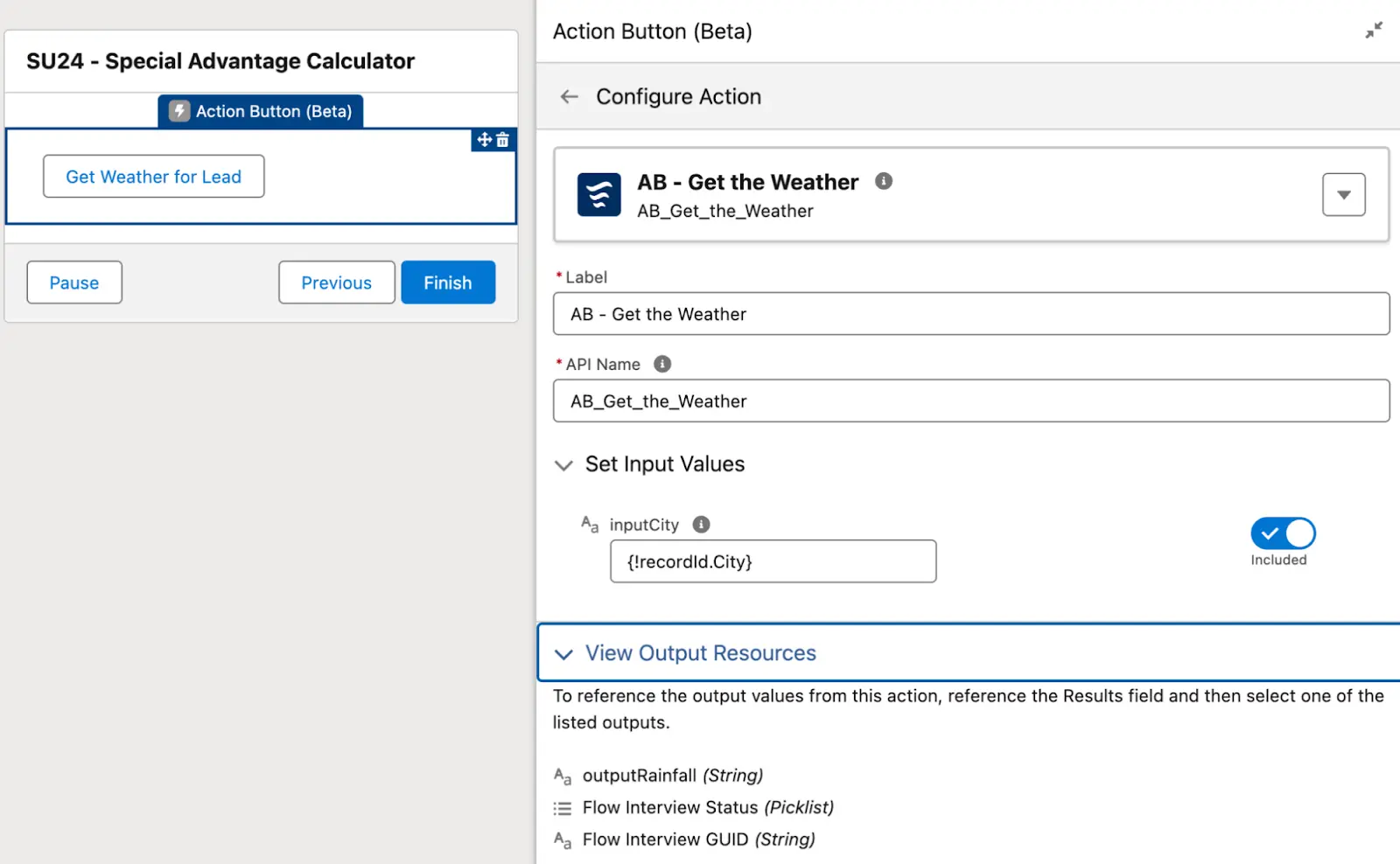
Action Buttons in Screen Flows enable users to carry out specific tasks smoothly within a flow. These buttons facilitate complex operations directly on the current page, much like how subflows operate. They handle external processes while influencing the flow internally, allowing for interactive input and output. This feature brings the flexibility and efficiency of custom buttons into flows, greatly improving the user experience.

Configure Components as Read-Only or Disabled:

Screen elements can now be adjusted to Read-Only or Disabled modes. You can apply these configurations to the following elements:

  1. Text/Long Text Area
  2. Date/Date & Time
  3. Number
  4. Currency
  5. Password
  6. Address

Test API Connectivity Through HTTP Callout in Salesforce Flow:

This feature allows users to validate API connections within a flow by performing HTTP callouts. During the setup of an external service call, users can test the connection and receive instant feedback, ensuring the API is accessible and functioning properly before finalizing the flow. This improvement simplifies external service integration, minimizing errors and speeding up the flow setup process.

Addresses Search Functionality in the Address Screen Component:

In Lightning Experience and Salesforce Classic, you now have the option to add a Google Maps-powered search field to the Address screen component. When users select an address from this search field within a screen flow, the flow will automatically populate the address fields.

To implement the Google Maps search functionality in Flow Builder, follow these steps:

  1. Create a screen flow in Flow Builder and add a Screen element.
  2. Include an Address component within the Screen element.
  3. Enable the Google Maps search field by setting the ‘Enable Google Maps Search Field’ option to {!$GlobalConstant.True} or by using a formula resource that evaluates to true.
  4. Assign a label to the search field.
  5. Save and test the flow to utilize the Google Maps search feature for addresses.

Development Enhancements:

Find Records with the Lightning Record Picker Component (GA):

The lightning-record-picker component enables you to search for Salesforce records that correspond to your input. It utilizes the GraphQL wire adapter to search and display records, allowing you to select one. 

In this example, the record picker component is set up to search for Account objects.

<lightning-record-picker label="Accounts” placeholder="Search Accounts..." object-api-name="Account"></lightning-record-picker>

Improvements in Lightning Web Components:

Lightning Web Components have received multiple updates, including new attributes for components like lightning-datatable, lightning-input, and lightning-input-field. These enhancements offer developers greater flexibility and additional options for creating user interfaces.

Utilizing the Null Coalescing Operator in Apex:

The ?? operator returns the value on its left if it is not null; if it is null, it returns the value on its right. This operator simplifies code by eliminating the need for verbose null checks, similar to how the safe navigation operator (?.) works. The ?? operator is used in the format a ?? b, where it returns a if a is not null, and b otherwise. It is left-associative, meaning the left operand is evaluated only once, and the right operand is only evaluated if the left operand is null.

Account defaultAccount = new Account(name = 'Acme');
Account a = [SELECT Id FROM Account WHERE Id = '001000000FAKEID'] ?? defaultAccount;
Assert.areEqual(defaultAccount, a);

Apex UUID Class:

Apex now offers a UUID class that allows developers to create universally unique identifiers (UUIDs). This functionality is especially valuable for cases where unique and non-repeating identifiers are needed, improving data integrity and system reliability.

UUID randomUuid = UUID.randomUUID();
System.debug(randomUuid);

Enhanced Apex Support for SOQL Queries with Five Levels of Parent-to-Child Relationships:

SOQL now allows for relationship queries that span up to five levels of parent-child records. This enhancement enables you to retrieve parent-child records across five hierarchical levels using a single SOQL query. This capability is available for SOQL queries through REST and SOAP API calls on both standard and custom objects.

Applicable to: This update is effective in Lightning Experience and Salesforce Classic for Enterprise, Performance, Unlimited, and Developer editions.

Implementation: Starting with API version 58.0, SOQL relationship queries can include a parent root at the first level, with child relationships extending up to four additional levels from that root.

For example, an SOQL query can fetch records from the parent object Account along with its related child objects such as Contacts, Assets, WorkOrders, and WorkOrderLineItems.

SELECT Name,
    (SELECT LastName,
        (SELECT AssetLevel,
            (SELECT Description,
                (SELECT LineItemNumber FROM WorkOrderLineItems)    
            FROM WorkOrders)    
        FROM Assets)    
    FROM Contacts)    
FROM Account

Enhancement in Einstein Generative AI:

Enhance Workflow Automation with Einstein Generative AI:

In Lightning Experience, take advantage of Einstein generative AI to effortlessly automate workflows. Simply provide a description of what you need to automate, and Einstein will generate the necessary drafts. This includes screen flows, record-triggered flows, schedule-triggered flows, or autolaunched flows, tailored to your specifications.

Einstein generative AI simplifies workflow creation by translating user descriptions into functional flows. It utilizes various elements and resources from your organization, including custom objects. Initial drafts created by Einstein can include up to six elements. You can further refine these drafts by giving feedback to improve Einstein’s performance.

For example, Einstein can automatically draft a flow to send reminder emails to sales reps for leads that haven’t been contacted in 30 days. Users can then review and modify these drafts to enhance the effectiveness and accuracy of their automation processes.

Optimize Formula Efficiency Using Einstein for Formulas:

Einstein for Formulas now enhances your Salesforce experience by explaining formulas in Formula fields, default field values, and record validation rules, and also by correcting syntax errors. Available in Lightning Experience for Enterprise, Performance, and Unlimited editions, this feature overcomes the limitations of standard formula syntax checkers. Simply use the ‘Use Formula Assistant’ option in the Formula Editor to let Einstein identify and fix any syntax errors in your formulas.

Conclusion:

The Salesforce Summer ’24 Release brings a host of exciting updates designed to elevate your Salesforce experience. From enhanced automation capabilities with Einstein generative AI to advanced formula management and improved security measures, these updates promise to streamline your workflows, boost productivity, and ensure a more seamless user experience. With new features like the expanded SOQL relationship queries, the Google Maps search integration for addresses, and advanced flow management tools, Salesforce continues to innovate and refine its platform to meet the evolving needs of its users. Embracing these enhancements will help you leverage Salesforce’s full potential, driving greater efficiency and effectiveness in your operations.

Maximize the Impact of Salesforce Summer ’24 with Our Expertise

As you explore the exciting new features and enhancements in the Salesforce Summer ’24 release, it’s essential to have a partner who understands how to tailor these innovations to your unique business needs. 

Our team of seasoned Salesforce consultants and integration specialists is here to ensure you get the most out of this update.

At Megabytes Technologies, we specialize in providing the best Salesforce consulting services in South Africa, tailored to help your business thrive in a competitive landscape. 

Whether you need Salesforce integration services to seamlessly connect your systems or comprehensive Salesforce managed services to ensure ongoing success, our team of experts is here to support your journey every step of the way.

Ready to unlock the full potential of Salesforce? Contact us today to learn how our customized solutions can elevate your business performance.